


CNC Machine Controls are somewhat Generic as they can be Adapted to Different Machines by Changing Stored Parameters & Macro Programs
that tell Control how to run a Particular Machine.
This Special Parameter & Macro Program Information is Custom Written by the
Manufacture of Your Machine Tool
( NOT the Control Manufacturer Fanuc! )
Specificity for Each Model Machine Tool.
If this Control Information is Ever Lost ,
Your Machine
Will NOT Run Until it is Correctly Replaced!
In Early Strippit HECC80/1 Type Controls this Information was in Non-Volatile EPROM Memory that could Store it Correctly for Decades
even with No Power to Control & Machine.
Later Strippit HECC80/3 Controls and Fanuc GN6 Controls Stored this Data in Bubble Memory that also required No Power to hold it for Decades.
Fanuc OP Control was used by Strippit, Amada,
and other CNC Machine Tool Companies in Late 1980's and 1990's. The OP is a Good Control, but
Stores Critical Parameters & Macro Programs in Volatile, but Battery Backed-Up RAM Memory.
Strippit & Fanuc Poorly Document the Fact that
YOU are Suppose to put New Batteries in Control
Every Year. And let's be Honest , if you even
Have Strippit & Fanuc Controls Books, Nobody at Your Company Has Ever Read the Books Anyway!
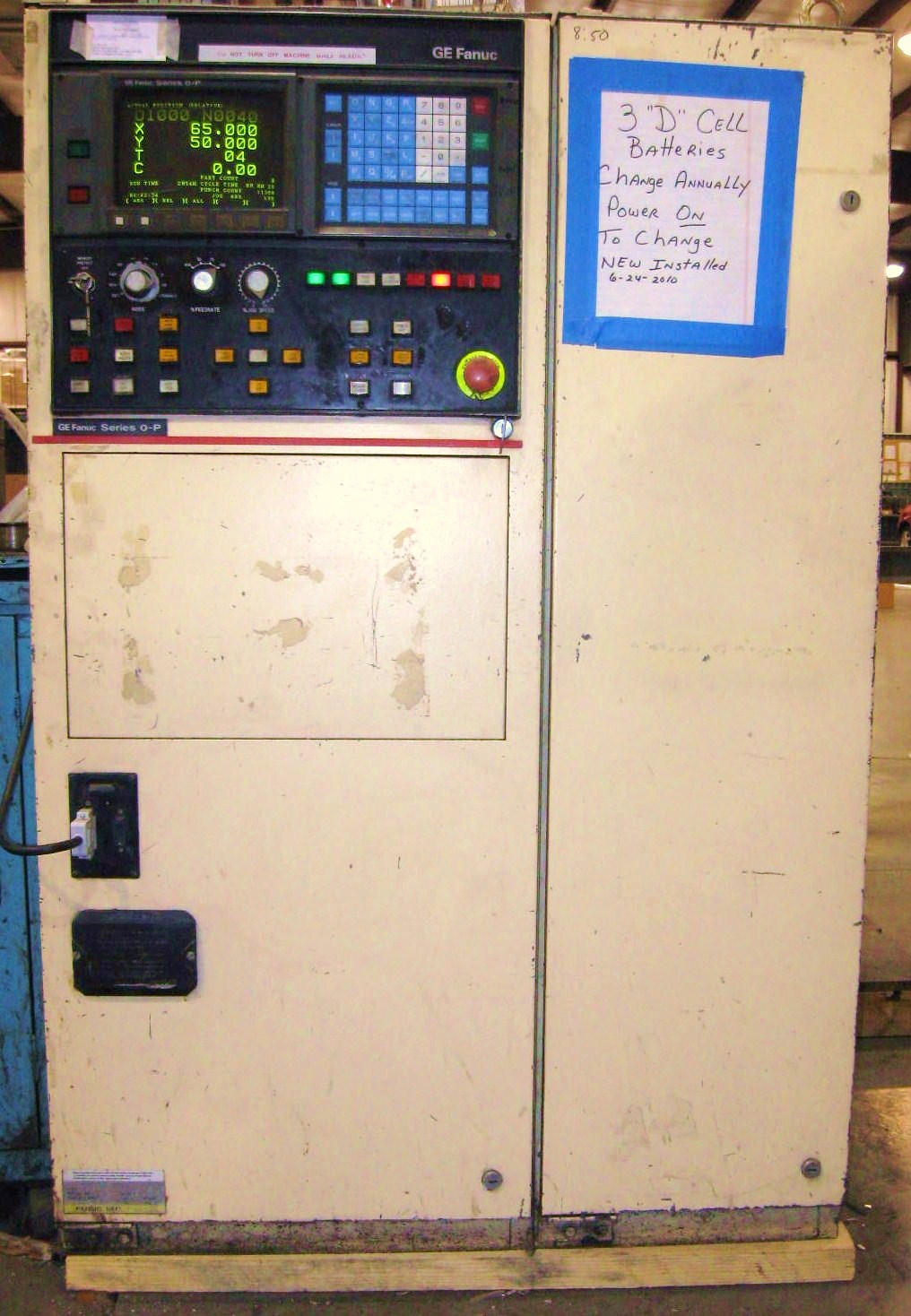
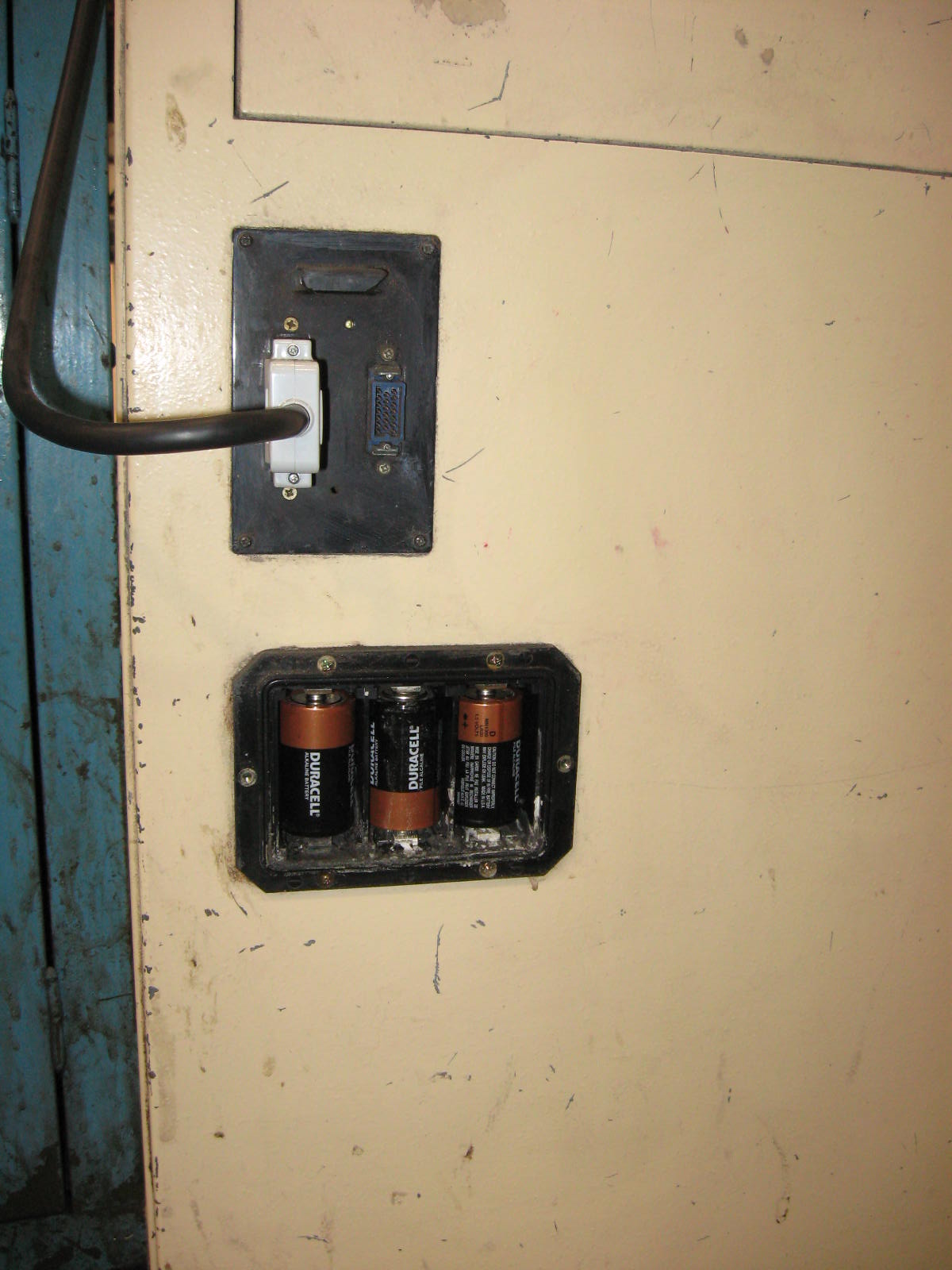
So, Sit Down on Floor and Read the Hard-To-Read Printing Molded into Black-Cover in Lower Left
Side of your Control, Like Control in Photos.
It says Change Batteries once a Year and Be Sure
Control Power is ON when Replacing Batteries.
When Control is On, Power is Supplied to RAM Memory to keep Data Stored. When Control Power is Off, Batteries take over to keep Data Stored.
If you do not change Batteries once every year,
eventually Batteries Wear-Out and
Data will be Lost and Machine will NOT Run.
Typically, Machine Manufactures Supplied Disks,
Tapes, or Printed Copies of Data so a Good
Technician could Reload Lost Control Data. But,
You Probably Lost Data when You Lost Manuals.
If you do not have Data Copies and if Machine
Company has Gone Out Of Business or
Can't Supply Correct Data,
Your Machine Tool is Now SCRAP Metal.
Typical Symptoms are 100 and 101 Alarm Error Code Messages on Control CRT Display. There is Sometimes a "Low Battery" Message on Display.
So, Before this Happens, I Advice;
1 -- Change The Fucking Control Batteries!!!
2 -- Download Copies of ALL Parameters and
Macro Programs to a PC Computer and
Store them in a Couple of Thumpdrives in
Safe Places! You need an Experienced
Fanuc Control Technician to get All Data!!!
To Change Batteries;
1 -- Turn-On Control
2 -- Leave The Control On!!!
3 -- Remove Black Battery Cover.
4 -- Remove the 3 "D" Batteries.
5 -- If Battery Holder Contacts are Dirty or
Corroded, Clean with a Scotch-Bright Pad.
6 -- Put in 3 New Alkaline Batteries.
Do NOT use Rechargeable Type Batteries!
7 -- Make sure you Orient Batteries in Correct
Direction, so that Plus & Minus are Correct!
8 -- Replace Cover.
9 -- Tape a Paper-Log to Control showing Date
Batteries were changed so you know when to
change them again, like this Customer
taped on Front Right of their Control.
Strippit & Fanuc OP-Control Battery Problems
and Repair Resources
Note #1
Be Very Careful Buying a Machine Tool that has Battery Backed-Up Memory that has been Disconnected and Stored in a Warehouse. These Machines, Typically Sold By Used Machine Dealers, often have "Lost" Books & Manuals, Lost Control Data Disks & Print-Outs, and Controls have Lost Parameters & Macro Program Data because it may Not have been under Power for Years. Make Sure you get an Iron-Clad Warranty that Control & Machine will Run, and make the Seller Supply Books & Manuals & Data Copies, or Do Not Buy The Machine!
Note #2
General Electric 1050 CNC Controls from Late 1970's and 1980's also have Battery Backed-Up Memory. But G.E. was Clever and had 2 Sets of Batteries. 1 set of "D" batteries in a Holder inside Control. And a Second Small Lithium or Alkaline Battery Hidden in Backside of the Cardcage Backplane. Consult your G.E. Control Books and have an Experienced Technician Change BOTH these batteries, Every Year, without Dumping this Critical Data.











This page was last updated: June 15, 2025

Global 20 & Global 30 Encoder Battery Problems
Starting about 1999, LVD Strippit Co. built "Global" ( and Other) Machines that used
Battery Backed-Up Fanuc Absolute Encoders on Machine's X, Y, T, and C Axis.
These Absolute Encoders are Programmed with Correct Values for
THIS Particular Machine's Zero & Home Positions.
If A.C. Power is Maintained to Machine, there is Power available to CNC Control to
Maintain these Stored Values. When A.C. Power is off for a relatively Short period of time,
the Special Fanuc Batteries for each Axis will maintain Stored Encoder Position Values.
However, when A.C. Power is off to Machine for an Extended length of time,
such as when Machine is Stored or Sold & Moved,
Batteries may go Dead and Stored Position Data in the Absolute Encoders will be Lost.
Machine Will NOT Run At All If This Encoder Position Data is Lost!
At This Point,
Repair will require replacing Expensive Special Fanuc CNC Control Batteries,
and a Service Call by a Experienced Serviceman to Determine Proper Values for Each Axis,
and then Reloading & Adjusting Proper Values into Encoders for All 4 or 5 Axis.
Traditionally, we Advise Turning-Off A.C. Power to Machine at Night & Weekends
as this Helps Protect against Power-Surges & Lightning-Strikes.
But, Batteries will slowly Drain whenever Power is Off going to the Machine.
Consult LVD Strippit Co. & Fanuc Co. Control Manuals for the
Best-Practices on this Matter for Your Machine & Control.
I would also Change the Special Batteries every year or so. You Have Been Warned......












Fanuc Repair Parts & Repair Services on
CNC Controls and Servo Drive Systems
I don't particularly like the Fanuc Company and some of their business practices. But with
Fanuc is now Biggest CNC Control Manufacture in the World, and Most Strippit and
Other Machine Tools Now come Standard with Fanuc CNC Controls & Servo Systems.
We, here at Machine Technologies Co., do not provide much Fanuc Parts & Service,
as there are plenty of other Servicemen & Service Companies that do.
So, Here are some, but certainly not all,
Resources for Fanuc Repairs & Repair Parts;
Lakeside CNC Group Inc. --- Bensenville, Illinois Phone 630-616-0039
Specializes in Fanuc CNC Electronics, Servo Drives & Motor Sales & Repairs.
Repair Zone --- Bay City, Michigan Phone 866-237-3212
Specializes in Servo Drives, and Servo Motor Sales & Repair Service.
General Servo & Spindle Motors --- South Elgin, Illinois Phone 630-889-9261
Specializes in Servo Motor and Spindle Motor Repair.
CNC Engineering Inc. --- Enfield, CT Phone 860-749-1780
Specializes in Fanuc Control Retrofits as well as Electronic & Motor repair parts.
Dynamic Displays --- Eau Claire, WI Phone 715-835-9440
Specializes in Retrofitting LCD-Displays for Old Control CRT-Monitor Displays.
Qualitrol International --- Charlotte, NC Phone 877-536-0090
Specializes in GE Fanuc CNC Repair Services & Repair Parts.
FANUC America Corporation --- Hoffman Estates, Illinois Phone 888-326-8287
Official Fanuc Parts & Service in the U.S.
Note, in 1970's & 1980's, Fanuc used the More "American Sounding" Name of
"General Numeric" for it's U.S. Division. General Numeric was & is Fanuc.
This General Numeric Name has now been dropped as they don't care anymore.
























Every Week I get a Couple of Frantic Calls from Shops Saying
"We Lost Our Fanuc Control Parameters and Macro Programs
and Now Our Machine Won't Run!"
Well, No Shit Sherlock Holmes.....
Next They Tell Me, ( Pick Your Favorite Whiny Excuse Here )
--- We Can't Find our Back-Ups
--- Someone threw Back-Ups Out
--- We No longer have the Reader to Read Back-Up Tapes
--- We Lost Back-Up Tapes or Tapes are Ruined
--- We No Longer have the Disk Reader to Read Floppy Disks
--- We Lost Floppy Disks or Disks are Damaged
--- We Lost Instructions and Don't know How to Back-Up / Re-Load
--- What's a Back-Up?
There are Many Different Versions of Control Software & Data and
The Software is usually Tailored a Bit for YOUR Specific Machine.
You are now going to Have to Find
one of the Damn Few Experienced Strippit Servicemen Left
who can Reconstruct this Software that You Did Not Bother to Back-Up.
Machine will now be "Down" a Good-While and will be Real Expensive to Fix.
And until it's Reconstructed Properly, Your Machine is Non-Running JUNK.
LVD (Ex-Strippit) if you ask nicely, will Sometimes Email you Data Files
to Re-Load, But can be Difficult to do if you are not Familiar with Procedures,
So, If Your Machine and Control are Still Running OK,
Don't Be A Stupid Dick,
Call-In a Good Serviceman and Get All Your Control Data Backed-Up NOW!
Because Backing-Up this Data can be Tricky,
Use a Experienced Strippit or Fanuc Serviceman
Because If you Mess The Data Up, Machine Won't Run!
There are Also Lots of Companies that Sell Various Data Devises that Plug
Into your Fanuc Control to Store Parameters and Macro Programs.
and Keith Coffee Sells a Reader for about $500 that plugs into Control
to Download onto Cheap $8 SD Memory Cards.
Keith, Listed on East-Coast Here, is also Good at Reconstructing Lost Data.
Find a Way to Just get Back-Up Done or Suffer The Consequences.
You Have Been Warned.